The ToolSmart concept is simple : each tool pairs with a free smartphone app (iOS and Android) that captures measurement data in real time, stores it within organized project files, and performs on‑the‑fly calculations-wall area, room volume, miter angles, material quantities. The app can even connect to Lowe's for pricing and ordering, turning a measurement session into a materials order without a single handwritten digit. It's a vision of the connected job site that, while still in its early iterations, hints at a future where the most valuable tool in your kit isn't the one with the sharpest blade, but the one that talks to your phone. The question General Tools is asking-and that we'll explore across all four ToolSmart devices-is whether these connected capabilities genuinely make your work faster and more accurate, or whether they're a layer of digital complexity that gets in the way of grabbing a tool and using it.
The ToolSmart App : The Brain That Ties Four Tools Together
Before diving into each tool individually, it's worth understanding the app that powers the entire ecosystem. The ToolSmart app is a free download that handles Bluetooth pairing, data capture, and project management. When you launch the app, you create a project-say, "Master Bathroom Remodel" or "Kitchen Backsplash"-and then connect the specific ToolSmart device you're using. Measurements taken with a laser distance measurer, angle finder, or multimeter appear on the phone screen in real time, and you can save each reading to the project with a tap. The inspection camera streams live video to the phone and lets you capture still images or video clips directly to the project file, sorted by date.
The app's standout feature is its suite of calculation modes. For the laser distance measurer, you can choose from direct distance, area/perimeter, volume, indirect height (using triangulation with two or three measurement points), and even an auto‑add‑10% function for material waste. That means you walk into a room, shoot the length and width, and the app instantly calculates the square footage for flooring or paint-and adds a 10% overage so you don't come up short. This is the kind of arithmetic that's simple in theory but prone to error when you're juggling a tape, a pencil, and a mental note. The app eliminates the middleman. It also can't recall a number incorrectly or transpose digits because you're distracted.
There are limitations, and they're largely centered on the app's maturity. At the time of testing, photos and videos captured with the inspection camera cannot be exported from the app on iOS-they don't appear in the phone's native camera roll, nor can they be emailed or shared directly. This hobbles the documentation workflow, because the whole point of capturing inspection images is to include them in an estimate or show a client. The app also lacks any photo editing or annotation capabilities, so you can't crop an image or circle a problem area. These are software issues, not hardware, which means they can be addressed in future updates. General Tools has a feedback mechanism, and the app's feature set will likely grow. But as it stands, the app feels like a capable debut that's still a version or two away from being truly indispensable.
General ToolSmart Laser Distance Measurer : $70 Buys You 100 Feet of Reach and a Personal Estimator in Your Pocket
The laser distance measurer is the most natural fit for Bluetooth connectivity because distance measurements are the raw material of estimating. The General ToolSmart Laser Distance Measurer itself doesn't push any boundaries in its standalone capabilities : it measures from 8 inches to 100 feet with an accuracy of ±1/16 inch, features a 4‑line backlit LCD, stores up to 20 measurements internally, and runs on two AAA batteries for a typical 3,000 measurements. It's an IP54‑rated tool that feels solid in the hand, with eight buttons that control power, mode selection, addition/subtraction, and Bluetooth pairing. The laser is a Class 2 red beam (630‑660nm, <1mW), and the response time to acquire a measurement is a maximum of two seconds. It can track continuously, measure area and volume on‑device, and perform indirect height calculations via triangulation-all of which are standard for a mid‑range laser distance measurer.
The transformation occurs when you pair it with the ToolSmart app. Suddenly, each shot you take can be assigned to a specific project and a specific mode. If you're calculating square footage for flooring, you select the area mode, shoot the room length, shoot the width, and the app multiplies the two and displays the result. It can then add 10% for waste automatically. If you're estimating paint, you might use the indirect height mode to get a wall's height without a ladder-shoot the bottom of the wall, aim the laser at the top, and the app computes the vertical distance using the Pythagorean theorem. All of these measurements are saved, so you can walk through an entire house, shoot every room, and return to your truck with a complete digital record. No lost notepad, no second trip because you forgot to measure the powder room.
The Lowe's integration is a particularly savvy addition. Once the app has calculated, say, the square footage of tile you need, you can tap through to Lowe's online catalog and see pricing or place an order. This closes the loop from measurement to material acquisition in a way that feels genuinely modern. Whether it saves you money depends on Lowe's pricing, but it definitely saves you time. And for Pros who bill by the hour, a tool that cuts an hour off the estimating phase on every job is a tool that pays for itself in days.
| Specification | Detail |
|---|---|
| Model | ToolSmart Laser Distance Measurer |
| Measurement Range | 8 in. to 100 ft. (200 mm to 30 m) |
| Accuracy | ±1/16 in. (±1.5 mm) |
| Resolution | 1 mm |
| Laser Class | Class 2, 630‑660 nm, <1 mW |
| Response Time | 2 sec max |
| Display | 4‑line backlit LCD, 1.75 in. diagonal |
| Memory | 20 measurements, auto‑cycling |
| IP Rating | IP54 |
| Battery | 2 × AAA (included), ~3000 measurements |
| Operating Modes (Standalone) | Direct distance, add/subtract, continuous tracking, indirect (2‑ or 3‑point), area, volume |
| App‑Enhanced Modes | Material estimation (flooring, paint, tile, molding), auto 10% waste, Lowe's integration |
| Weight (without batteries) | 4.2 oz (120 g) |
| Operating Temperature | 32° to 104°F (0° to 40°C) |
| Price | $69.98 |
General ToolSmart Video Inspection Camera : A Flexible Eye That Sends the View to Your Phone-but Won't Let You Share It Yet
Inspection cameras are the unsung heroes of diagnostics. Whether you're peering inside a wall cavity to locate a leak, checking for obstructions in a duct, or verifying that a wiring run is properly secured, these tools save you from cutting exploratory holes. The General ToolSmart Video Inspection Camera packs a surprisingly slim 8 mm camera head onto a 3.3‑foot flexible, obedient probe-meaning it holds its shape well when bent. The camera carries an IP67 rating, so it can handle wet, dirty environments without flinching. Four adjustable‑brightness white LEDs ring the lens, illuminating the dark spaces it's designed to explore. The built‑in 2.7‑inch color TFT LCD screen provides a local view, and the camera records still images (640 × 480 VGA resolution) and video to a microSD card if one is inserted.
Bluetooth connectivity adds a layer of convenience that anyone who has ever twisted themselves into a pretzel to see an inspection camera screen will appreciate. When paired with the ToolSmart app, the camera's live feed appears on your smartphone or tablet in real time. You can set the phone on a tripod or prop it against a toolbox, and manipulate the probe with both hands without worrying about the screen orientation. The app also lets you capture photos and videos directly to the project file, either by pressing a button on the camera body or tapping a software button on the phone screen. This means every inspection image is automatically organized by project and date, creating an instant documentation trail.
The missing piece-and it's a big one-is the inability to export those captured images from the app. On iOS at least, photos and videos live only within the ToolSmart app's ecosystem. You cannot email them to a client, you cannot upload them to a cloud service, you cannot pull them into an estimating document. They're trapped. This seems like an oversight that General Tools will surely address in a future update, because the ability to send a photo of a corroded pipe to a homeowner along with an estimate is the entire purpose of capturing images on a connected device. Until that export function exists, the inspection camera's connectivity is a convenience for the operator, not a communication tool for the business. That's a significant distinction, and it means the camera's Bluetooth capability currently serves personal documentation rather than professional presentation.
Aside from that app limitation, the hardware itself is solid. The 8 mm camera head is among the slimmest on the market, squeezing into 3/8‑inch holes and tight conduit bends. The three included snap‑on accessories-a 45° mirror for looking sideways, a pickup hook for retrieving dropped screws, and a magnetic pickup for ferrous debris-expand the camera's utility beyond simple visual inspection. The flexible probe is obedient enough to hold a shape but pliable enough to snake through curved paths. Power comes from four AA batteries, which are included, and the wireless range is a respectable 60 feet unobstructed-ample for most residential and light commercial work.
| Specification | Detail |
|---|---|
| Model | ToolSmart Video Inspection Camera |
| Camera Head Diameter | 8 mm (0.31 in.) |
| Probe Length | 3.3 ft (1 m), flexible‑obedient |
| IP Rating | IP67 |
| Field of View | 54° |
| Depth of Field | 1.2 in. to 10 ft (30 mm to 3 m) |
| Camera Resolution | 640 × 480 pixels (VGA) |
| Lighting | 4 white adjustable‑brightness LEDs |
| Built‑in Display | 2.7 in. color TFT LCD, 960 × 240 pixels |
| Bluetooth/WiFi Range | Up to 60 ft (18 m) unobstructed |
| Power | 4 × AA batteries (included) |
| Weight (with camera) | 12 oz (340 g) |
| Included Accessories | 45° mirror, pickup hook, magnetic pickup |
| Price | $129.98 |
General ToolSmart Digital Angle Finder : Bluetooth Meets the Miter Saw's Best Friend
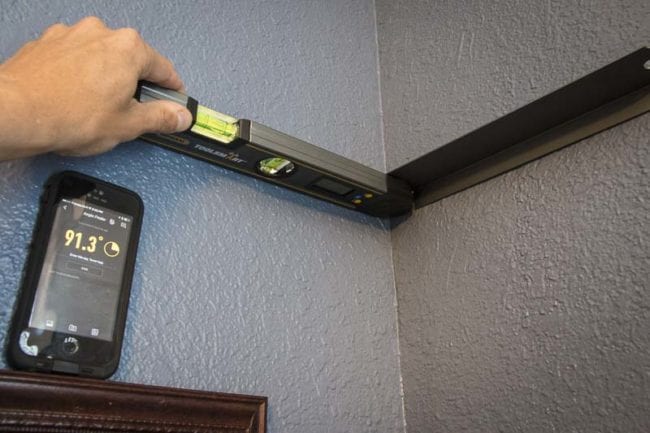
If you've ever installed crown molding in a pre‑World War II home, you know that corners are never exactly 90 degrees. They're 91.3°, 88.7°, or-in the worst cases-something like 93° on one wall and 87° on the other. A digital angle finder that reads to a tenth of a degree is the difference between a miter joint that fits tight and one that requires a half‑tube of caulk. The General ToolSmart Digital Angle Finder is a straightforward tool : two aluminum arms pivot from 0° to 225°, with a 1.6‑inch LCD displaying the angle to a resolution of 0.1° and an accuracy of ±0.3°. It runs on a single CR2032 battery, features a 5‑minute auto‑power‑off, and has a lock button to hold a reading while you transfer it to your saw's bevel gauge.
The Bluetooth integration takes this simple, essential tool and adds a layer of convenience that you didn't know you wanted until you're on a ladder, in an awkward corner, trying to read a small screen. Paired with the ToolSmart app, the angle reading appears on your phone, which you can set on a work surface or hand to a helper. Press a button on the angle finder to save the measurement to the project file, and the app records it along with a timestamp. You can walk around a room, capture every corner angle, and return to the miter saw with a complete list of exact settings-no memory fades, no transposed digits.
The lack of a dedicated "save" button on the tool itself is a minor ergonomic miss; you have to tap the save function within the app, which means you need the phone in hand or nearby. In an ideal world, a button on the angle finder would capture the reading with a single press, even if the phone is in your pocket. That's a feature that could appear in a hardware revision. For now, the workflow is a two‑step process : read the angle, tap save on the phone. It's still faster than writing it down, and it dramatically reduces the chance of error when you later dial in a 46.7° miter cut because you remembered the angle as 47°.
| Specification | Detail |
|---|---|
| Model | ToolSmart Digital Angle Finder |
| Measurement Range | 0° to 225° |
| Accuracy | ±0.3° |
| Resolution | 0.1° |
| Display | 1.6 in. diagonal LCD |
| Auto Power Off | 5 minutes |
| Dimensions | 12 × 2 × 0.9 in. (305 × 51 × 23 mm) |
| Power | CR2032 battery (included) |
| Bluetooth Function | Real‑time angle display in app, save to project |
| Price | $49.98 |
General ToolSmart Digital Multimeter : Real‑Time Remote Monitoring for Diagnostic Work Done in the Dark
Multimeters are the quintessential "check and move on" tool. You probe a circuit, read the voltage, and either it's within spec or it isn't. Documenting those readings is tedious and often skipped-until something goes wrong and you need a record. The General ToolSmart Digital Multimeter adds Bluetooth to the equation, letting you view voltage, current, resistance, and temperature readings on your phone in real time. The meter itself is a competent entry‑level professional tool : it measures AC/DC voltage up to 600V, AC/DC current up to 10A, resistance up to 40 MΩ, and includes a bead thermocouple probe for temperature measurements from -4°F to 500°F (with an accuracy of ±2% on the probe). It's CAT III 600V safety rated, includes non‑contact voltage detection, and features an auto‑ranging capability with manual override. The physical interface is the familiar rotary dial, complemented by a 3‑3/4 digit LCD (max count 4000).
The Bluetooth capability serves two primary use cases. First, the phone acts as a secondary display, which is invaluable when the meter is placed inside a panel and you can't easily see its screen, or when it's resting on the floor while you're on a ladder. You open the app, the reading appears, and you're not craning your neck. Second, because there is no backlight on this first‑generation ToolSmart multimeter, working in dimly lit basements, attics, or electrical rooms can be frustrating. The phone's backlit screen solves that instantly. You can also take photos within the app to document a test setup or a particular connection point, which adds visual context to the stored measurement data.
As with the angle finder, you still need to actively save readings from the app if you want to recall them later-the meter doesn't auto‑log with a single button press on the device. But for a $49.98 multimeter that can stream data, it's an impressive value. The build quality is typical General Tools : functional, not luxurious, with double‑insulated test leads and a 9V battery included.
| Specification | Detail |
|---|---|
| Model | ToolSmart Digital Multimeter |
| AC Voltage Ranges | 0‑600V |
| DC Voltage Ranges | 0‑600V |
| AC/DC Current Ranges | 0‑10A |
| Resistance Ranges | 0‑40 MΩ |
| Temperature Range (thermocouple) | -4° to 500°F (-20° to 260°C), ±2% accuracy |
| Safety Rating | CAT III 600V |
| Display | 3‑3/4 digit LCD, 4000 count max, no backlight |
| Bluetooth | Real‑time data streaming, photo capture |
| Bluetooth Range | 33 ft (10 m) unobstructed |
| Power | 9V battery (included) |
| Weight (including battery) | 8.2 oz (232 g) |
| Included | Test leads, bead thermocouple, battery, manual |
| Price | $49.98 |
The Digital Transformation of Estimating : How ToolSmart Changes the Workflow
The collective value of the ToolSmart line is greater than any single tool. Because all four devices feed into the same app, a single project can contain laser‑derived room dimensions, inspection camera photos of problem areas, angle measurements for miter cuts, and electrical readings from a panel. You walk into a renovation, shoot the room, capture a photo of a corroded pipe behind the wall, measure the corner angles for the new crown, and verify that the outlet voltage is correct. All of that data lives in one digital folder, time‑stamped and organized. At the end of the day, you can review the project, generate a materials list, and email the pertinent details to a client or a supplier.
This is the promise that General Tools is working toward, even if the current app hasn't fully realized it. The absence of image export, the lack of annotation tools, and the occasional Bluetooth connectivity hiccup are reminders that this is a version 1.0 ecosystem. But the foundation is solid. The tools themselves are affordable-none exceeds $130, and the multimeter and angle finder are under $50 each-so the barrier to entry is low. A Pro could experiment with the laser distance measurer for $70, see how the app integrates into their estimating routine, and then decide whether to add the inspection camera or angle finder.
Who Should Invest in the General ToolSmart Ecosystem? And Who Should Wait?
Invest now if :
- You're an independent contractor, remodeler, or handyman who currently estimates by hand and wants to digitize measurements without learning complex CAD software.
- You frequently work alone and value the ability to view measurements or inspection feeds on a phone placed on a tripod or workbench.
- You want a budget‑friendly connected laser measurer with automatic waste calculation and material estimation; at $70, it's hard to beat.
- You're already a Lowe's customer and appreciate the ability to move from measurement to ordering within one app.
- You enjoy early‑adopter technology and are willing to provide feedback that could shape future app updates.
Wait-or skip-if :
- You need rock‑solid, exportable documentation right now, especially inspection images. The app's inability to share photos is a dealbreaker for professional reporting.
- You dislike smartphone dependency on the job site and prefer tools that operate entirely independently with large, bright built‑in displays.
- You require high‑precision metrology-0.3° accuracy on the angle finder is fine for carpentry, but not for machine setup.
- You're already heavily invested in a competing Bluetooth tool ecosystem (Bosch, DeWalt, Fluke) and don't want to run multiple apps.
Conclusion : A Promising First Step Toward the Paperless Jobsite
General Tools has planted a flag in the emerging market of affordable, app‑connected tools, and the ToolSmart line is a credible opening salvo. The hardware is competent, the prices are approachable, and the app-while still evolving-demonstrates a clear vision of how digital integration can reduce errors, speed up estimating, and create a permanent record of job‑site data. The laser distance measurer is the standout, offering meaningful material calculation features that genuinely save time. The angle finder and multimeter add convenience through remote display and digital record‑keeping. The inspection camera brings a flexible, narrow probe to tight spaces, though its connectivity payoff is currently hobbled by the app's lack of export functionality.
This is a product line that will improve as software updates roll out, and General Tools has wisely left room for user feedback to guide development. If you can tolerate an app that's still finding its footing, the ToolSmart tools offer a tantalizing glimpse of a future where your smartphone is the hub of every measurement, every inspection, and every estimate. And if you're the type who still jots numbers on a scrap of gypsum board, the laser distance measurer alone might just convert you to the digital side. At $69.98, it's the cheapest employee you'll never have to remind to write legibly.
General Tools ToolSmart series tools are available through major retailers and online. Prices and specifications are current as of this review and subject to change.
Comments 0
Leave a Comment